Understanding build failures
Inspect generation, sandbox, connection, and deployment failures.
Wrenly generates source through an MCP server, then installs dependencies and validates the application in a Docker sandbox. Each build can make up to three attempts. A model provider supplies the model used for generation.
Publishing availability and failures
Laravel requires the operator-built wrenly/laravel-runtime:13-php8.4 image and
Laravel 13 source. Older Laravel 11/12 projects are not automatically upgraded. Missing
runtime-image errors require building the trusted toolchain; do not install PHP on the
API host or disable Composer security checks to make dependencies pass. Database
provisioning, persistent uploads and background workers remain separate capabilities.
Publishing returns PUBLISHING_UNAVAILABLE when the instance has not enabled the
new private image path. Building and local previews remain available. The old
public-clone/source-rebuild adapter cannot be enabled by configuration.
Configured Next.js publishing tracks a separate durable operation. Failure does not turn the successful generation into a failed build. The workspace shows a safe failure category; server logs identify source synchronization, image compilation, registry upload, application configuration or readiness. Interrupted work requires operator reconciliation, not repeated deployment triggers. See Private publishing for setup and recovery.
If you previously published an app, review its Gitea repository visibility and committed environment files. Making a repository private does not revoke previously copied secrets: rotate exposed credentials and review affected application data. Wrenly does not automatically modify existing repositories or deployed apps.
Inspect a failure
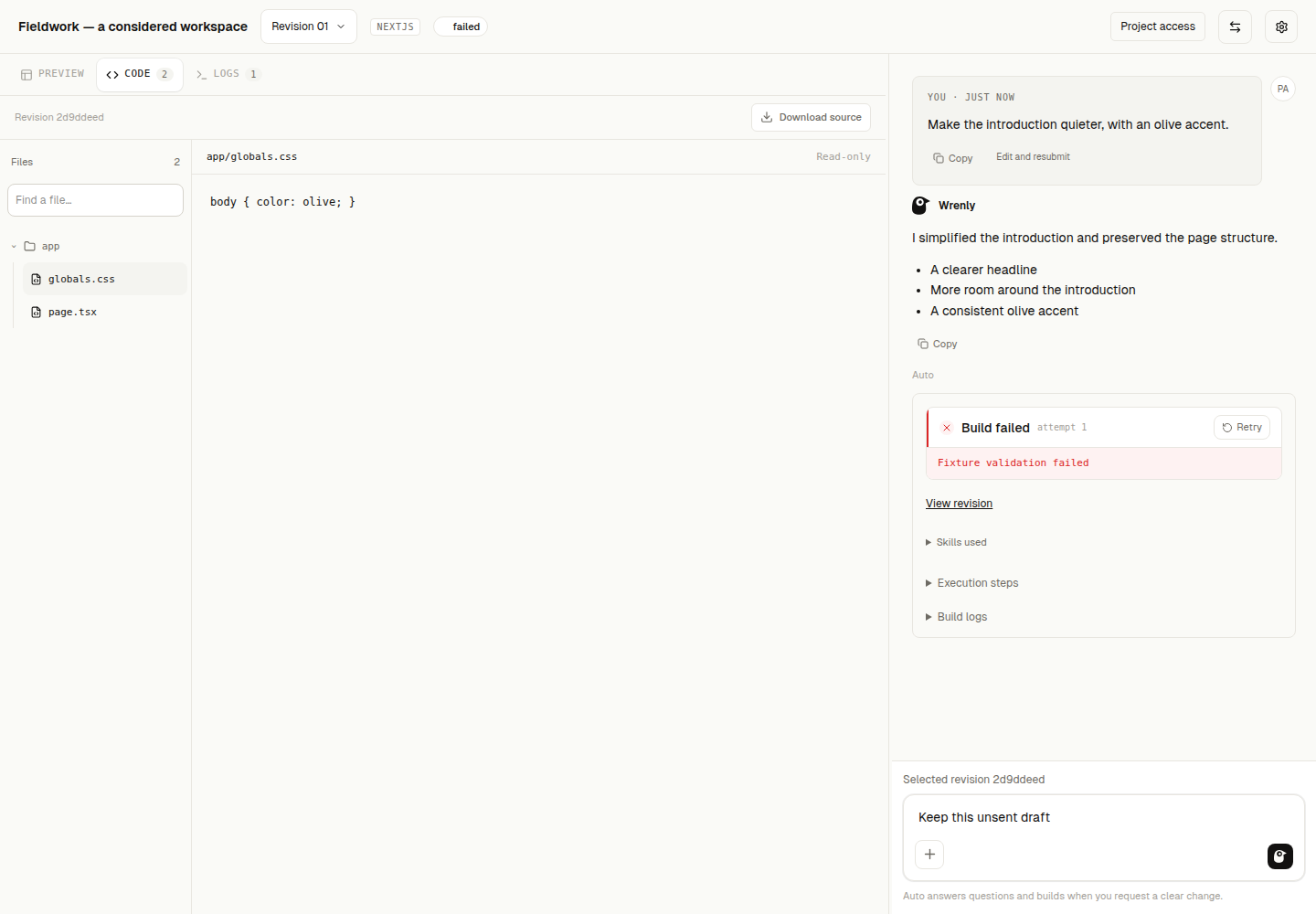
Open the project's Logs tab for attempt diagnostics and the failure message. The Code tab retains the latest generated files even if validation fails. Selecting a failed entry in History restores its saved source, logs, and error. Output currently arrives after each sandbox operation, rather than line by line while Docker runs.
If generation fails before valid files can be parsed, there may be no new source to display. A later generation failure preserves the last saved files for that build. Old failures created before artifact retention was implemented cannot recover source that was never saved.
Retry on a new failed history entry creates another build using the saved prompt, model/provider and stack. It keeps the old failure unchanged and uses its source and diagnostic for repair. Older builds without recorded inference settings cannot be retried exactly: submit their prompt as a new build with the model picker instead. Credentials are resolved from current server configuration and are never stored in build history.
If the API reports missing migrations after an upgrade, ask your instance operator to
run bun run db:migrate from packages/db, then restart the API. Keep existing data:
resetting the database is not a repair step. See Owner setup.
Connection loss
If a progress stream closes without a final result, Wrenly reports that the outcome is unconfirmed. Reload history before retrying. Durable execution continues independently of the browser subscription; reconnecting replays saved progress, files and results. An API restart interrupts unfinished execution rather than silently repeating model or deployment operations. Review the saved outcome before explicitly retrying. Progress streams send keepalives during quiet operations.
Model response errors
File-edit errors distinguish invalid JSON, invalid operation structure, unfinished responses and output-limit truncation. These are generation failures before sandbox validation. Raw model output is not copied into diagnostics. Existing source remains available; repair retries still have the normal bounded attempt limit.
App builds but looks unstyled
A successful Next.js compile does not prove Tailwind utilities were generated. For Tailwind 3, check the Tailwind content paths, PostCSS plugins, global CSS directives and root-layout stylesheet import. Wrenly now rejects missing structural prerequisites during builds and preview preparation. This check does not certify visual quality or inspect arbitrary configuration behavior.
Previously saved source is not rewritten by upgrading Wrenly. An existing preview can continue showing that source; submit an explicit repair against its selected revision. Tailwind 4 uses a different setup and is outside this Tailwind 3 check.
Invalid generation responses
An invalid JSON response from the model is a generation failure. It happens before Docker can validate the application. Invalid JSON inside a generated package manifest is instead reported during sandbox validation. The diagnostics distinguish those stages.
Request errors when using curl
The project ID must be a complete UUID without embedded line breaks or spaces.
Use nextjs, not next, as the current API stack value. A malformed request can
fail before a build is created, so it will not have a history entry.
Deployment errors
A successful build does not prove the deployed application can start. Coolify may finish building an image while the runtime container continues restarting. Inspect the application's runtime logs in Coolify to identify that failure. Opt-in local previews let you inspect a validated Next.js build independently of deployment. The current deployment path still requires hardening before public use.
Inspect related diagnostics
Open Logs in the project workspace. All sources keeps build output, preview preparation/runtime output and publishing status together in separate labelled sections. Use the source filters or search recorded lines. Clear search restores the output. Publishing currently provides status and safe failure explanations; remote deployment runtime logs are not available in this view.
Everything belongs to the selected revision. Switching revisions resets source/search selection and follows that revision's diagnostics. A source read failure is shown as unavailable while the other sources remain inspectable. Build failure and an unconfirmed build outcome remain distinct.
Scroll up to pause following. New lines and source updates do not resume it silently; use Follow latest to return to the end. Each source view shows at most the latest 256,000 characters with an explicit notice when truncated. Search covers that shown output. Reading diagnostics never retries a build or starts preview/publishing work.
Read execution steps
Expand Execution steps beside a conversation build to inspect recorded system operations: generation, source receipt, dependency installation and validation with network disabled. Each attempt keeps its own outcomes. Repairs do not overwrite the failed attempt. These steps report actual execution, separately from the model's answer or plan; they do not expose hidden reasoning or imply browsing is available.
Saved steps return after a refresh. A started step without a saved completion remains Unconfirmed after interruption. Check the canonical result and existing recovery controls before retrying. Older builds may have no detailed activity; their logs and result remain available. Opening steps never starts another build.
To revise your own prompt, use Edit and resubmit. This loads a new composer draft, with confirmation before replacing unsent text. The old message and build stay intact. Sending uses the currently selected revision, mode and model; shared-project model permissions still apply. Active work and unconfirmed admissions must be resolved first.
Local-preview publishing notices, media permissions, preparation actions and runtime output are available from Details / Needs attention, immediately after local preview status in the toolbar. The panel opens over the canvas instead of pushing it down. Media settings retain their existing authorization and revision tracking while the panel is closed. Stopping preview keeps its status and does not unpublish an app.
Laravel renders without styling
A successful PHP response does not prove every design rule was generated. Tailwind class names in Blade need a compiled stylesheet containing their CSS. Wrenly supports either complete local CSS or an offline asset build; it never loads the Tailwind CDN.
Check the selected revision's Blade stylesheet link and the CSS file it loads. Raw
@tailwind, @apply or @import "tailwindcss" directives are build inputs, not finished
browser CSS. Ask Wrenly to repair the local CSS or its complete offline build pipeline,
then create a new revision and prepare that revision again. Refreshing an older saved
preview does not replace its source. If every utility is compiled but the page remains
unstyled, check the browser's network panel for the stylesheet response and console
for blocked/missing assets.
After updating the trusted Laravel verification script, rebuild its runtime toolchain:
docker build -t wrenly/laravel-runtime:13-php8.4 packages/sandbox/images/laravelThis updates checks for future validation/previews; it does not repair existing generated source or prove visual fidelity automatically.