Project skills
Save reusable instructions and select exact versions for conversations and builds.
Create or import a skill
Open Settings → Skills to create instructions or import one reviewed SKILL.md.
A document contains YAML frontmatter (name, description) and Markdown instructions.
Names use lowercase letters, numbers and single hyphens. Documents are limited to 16 KiB.
Optional license/compatibility/string metadata fields follow the Agent Skills convention.
Imports are local text, not package installations. Preserve source, author/version and license notes. Source URLs are provenance only; Wrenly does not fetch them. External example links are optional, and self-hosted operation does not require a community account.
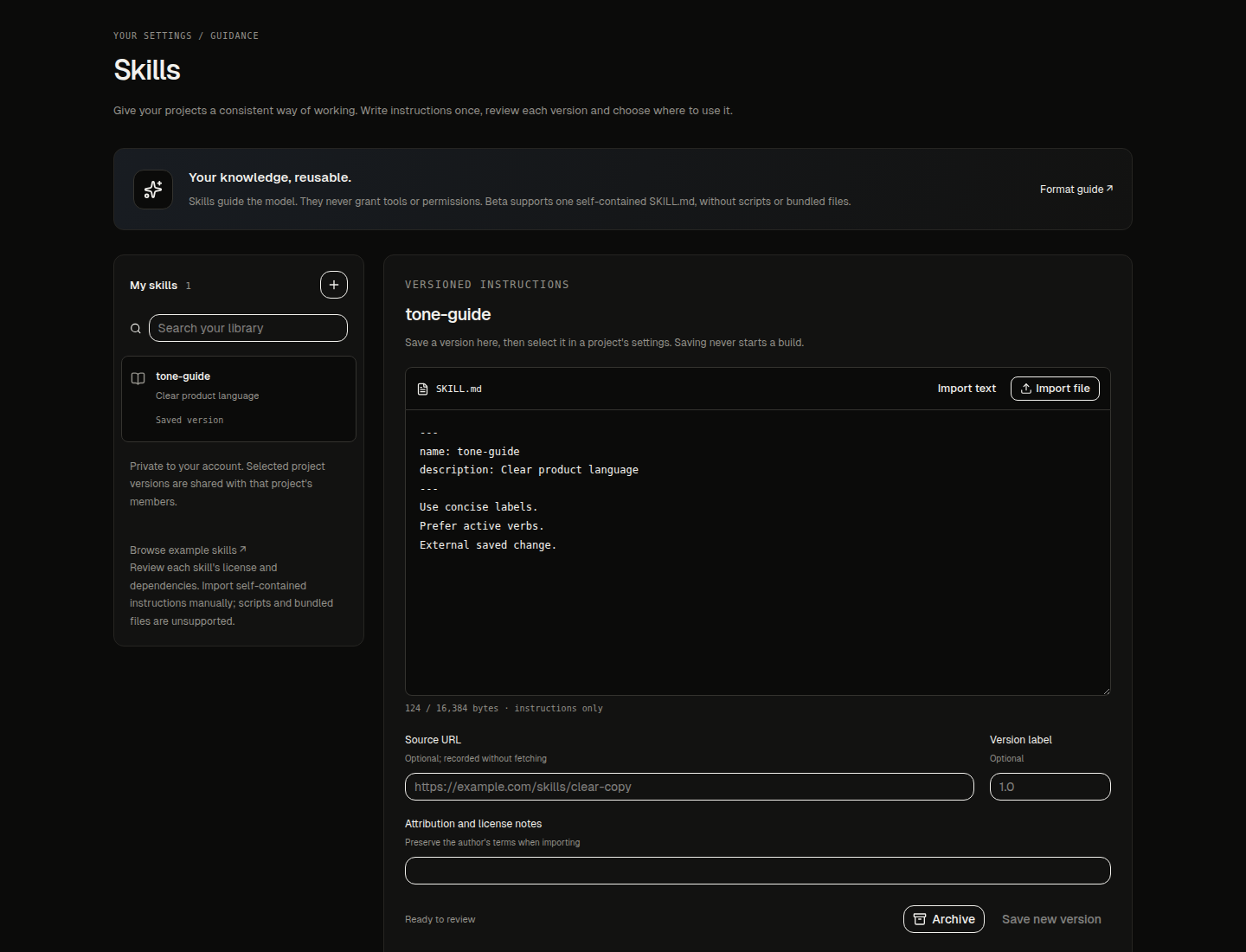
Save a version
Save skill creates an immutable version without starting inference. Editing appends another version. Archive/restore changes future availability while preserving history. Your library is private to your account, including from other instance administrators. There is a limit of 100 skill identities per account, including archived ones.
Guide the first prompt
On Home, open + → Skills before sending your idea. Review and choose up to four saved instructions, then send the prompt. Wrenly creates the project and pins those exact versions together before the first conversation starts. Nothing is selected automatically. If a chosen version is unavailable or archived, creation stops so you can review the selection; Wrenly never silently leaves its guidance out.
Select guidance for a project
In the workspace, open + → Project Skills to review and pin guidance without leaving your conversation. The project owner controls the selection; opening this panel does not call a model or start a build.
In Project settings → General → Project skills, the creator selects exact saved versions: at most four with 32 KiB combined documents. Project members can inspect the intentionally shared guidance; their personal libraries do not enter a shared build. Library edits never automatically replace a project's pinned version. Use Select latest saved version and save explicitly when ready to adopt an update.
Understand when guidance applies
Conversations and builds freeze the selected instructions at admission. Auto/Plan and Next.js/Laravel generation, editing and repair use that snapshot; explicit retry retains its original snapshot. Skills used records the exact versions/hashes. Plan remains planning-only. Skills never grant tools, browsing, credentials or sandbox networking.
If a selected skill is archived, new requests require owner review. Existing admitted work/history retains the original snapshot. Selection changes are blocked during active or unresolved project work, and archived projects remain read-only.
Recover an unconfirmed save
An uncertain save keeps its request identifier and text frozen. Check its acknowledgement before explicitly retrying the same save. Conflicts retain your draft for reload/review. Do not treat a missing acknowledgement as proof that the save failed.
Apply all checked-in migrations before starting an updated API. Beta supports only self-contained instruction documents: scripts, multi-file packages and automatic community installation are not included.